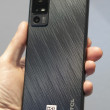
Motorola V810
MP3 Ringtones on V810!

Just found out you can make mp3 ringtones from any song you want to use on this phone.
First convert a mp3 to wav and edit which part of the song you would like to use as your ringer. I don't make my clips much more than 15 seconds.
Then convert the edited wav back to mp3 with these specifications:32 kbps (constant bitrate) / 22.05 kHz sampling rate / Mono. The file size should be less than 120 kb's. There are plenty of programs out there that will work, I just used Winamp.
Now just rename the ".mp3" extension to ".mid". Now the catch. You will still have to email the mid file as an attachment to your phone, so you have to have MMS with USCC. Just extract the mid file from you message, and apply it as your ring tone. 😁
First convert a mp3 to wav and edit which part of the song you would like to use as your ringer. I don't make my clips much more than 15 seconds.
Then convert the edited wav back to mp3 with these specifications:32 kbps (constant bitrate) / 22.05 kHz sampling rate / Mono. The file size should be less than 120 kb's. There are plenty of programs out there that will work, I just used Winamp.
Now just rename the ".mp3" extension to ".mid". Now the catch. You will still have to email the mid file as an attachment to your phone, so you have to have MMS with USCC. Just extract the mid file from you message, and apply it as your ring tone. 😁
...

I've done exactly what you said and it doesn't work. I've been working on this for awhile. When I try to extract it on my phone it fails at 95%. I've tried lots of different songs but I can't get anything to work.
...
Well, I sent one today, that was 68 kb's, and for some reason I got the 95% error thing also. I tried retieving the message several times, at different locations around my house, and then on like the fourth try, it finally retrieved the message. I also had this problem with a picture I tried sending myself a couple of days ago. I resent the message again from my email account, and it retrieved it right away. Hopefully it will work for you.
...
Benny Boo-Boo,
I tried making another ringtone last night, and I could not get past the 95% thing at all. I tried to retrieve the message around my house, outside the house, at work even in my car, and nothing worked. The file I was trying to send was 79 kb's. I noticed all the ringtones I made myself were under 70 kb's and worked on the first or second retrieval attempts. I reduced the file size to under 70 kb's by changing the bit rate down to 24kbps, and this time it worked on the first attempt. I could have shortened the file, but I didn't want to, and I can't tell the difference between the 2 bit rates. The specifications I got were from here:
http://68.123.100.210/~ninetoez/vxxx/maketones.html »
I know it says you can make f...
(continues)
I tried making another ringtone last night, and I could not get past the 95% thing at all. I tried to retrieve the message around my house, outside the house, at work even in my car, and nothing worked. The file I was trying to send was 79 kb's. I noticed all the ringtones I made myself were under 70 kb's and worked on the first or second retrieval attempts. I reduced the file size to under 70 kb's by changing the bit rate down to 24kbps, and this time it worked on the first attempt. I could have shortened the file, but I didn't want to, and I can't tell the difference between the 2 bit rates. The specifications I got were from here:
http://68.123.100.210/~ninetoez/vxxx/maketones.html »
I know it says you can make f...
(continues)
...
It worked!!!!!! After all this time messing around with it and I never thought of dropping down to 24 kbps. I didn't want to shorten the length of the ringtone either so this worked perfect. I'm forever in your debt!!
...
Hey no problem. I am glad to see that things worked out for you. I was getting pretty frustrated myself after getting the "95%" error 🤣
...

So I just followed the instructions you have here, converted an MP3 to WAV, cropped out the portion I want to use as a ringtone, saved it as .mp3, changed the file extension to .mid, and emailed it to my phone (I have USCC, with an smtp address setup for my phone). I receive the message correctly, but when I go to extract the attachment, the only item it's allowing me to extract is the reply info.
Do I have to be signed up for EasyEdge to get this working, or ???
Thanks in advance for any help!
-D
Do I have to be signed up for EasyEdge to get this working, or ???
Thanks in advance for any help!
-D
...

Yes, or you have to enable MMS on your phone. Take a picture with the camera and send it to your phone. This should enable MMS and it does not cost anything to send a picture from your phone back to your phone.
However, not all sound files you make will work with your phone. This topic has been discussed at great length in the USCC thread on Howard Forums. Some of the tricks have been posted here, but even then, not all ringtones you convert/make will work. Its sort of trial and error.
However, not all sound files you make will work with your phone. This topic has been discussed at great length in the USCC thread on Howard Forums. Some of the tricks have been posted here, but even then, not all ringtones you convert/make will work. Its sort of trial and error.
...
Thanks. I came to that realization last night, about 20 minutes after posting here. I got everything working this morning! Thanks for the help!
...

Can you tell me exactly how to do this stuff in razorlame? (saw you posted this option on howard forums) I downloaded the program, but I cannot figure out how to use it. Can you please tell me the steps you used to convert the mp3s and then send them to your phone 😲 Also, did you send it to your phone like a picture message or did you set up the email with USCC that you have to pay $1.95 a month to use?? Thanks in advance!
...
Hey there,
I've been away for awhile and just noticed your post. Here's how it works.
If you have downloaded Razorlame, make sure you also download the lame.exe.
http://mitiok.free.fr/lame-3.92.zip »
This actually does all the work, where razorlame is just a front-end for it. Extract the lame zip folder to the same folder where razorlame is located.(probably razorlame115)
Now open up RazoLame and go to LAME Options. Under the General tab, set the bitrate to 32 kbit, and Mode is set to mono. I don't mess with the settings in the other tabs. Now you should be able to add your edited wav file and hit Encode. This will create a mp3 in the same directory your edited wav file is saved.
Now to get this to your phone, change the "....
(continues)
I've been away for awhile and just noticed your post. Here's how it works.
If you have downloaded Razorlame, make sure you also download the lame.exe.
http://mitiok.free.fr/lame-3.92.zip »
This actually does all the work, where razorlame is just a front-end for it. Extract the lame zip folder to the same folder where razorlame is located.(probably razorlame115)
Now open up RazoLame and go to LAME Options. Under the General tab, set the bitrate to 32 kbit, and Mode is set to mono. I don't mess with the settings in the other tabs. Now you should be able to add your edited wav file and hit Encode. This will create a mp3 in the same directory your edited wav file is saved.
Now to get this to your phone, change the "....
(continues)
...

Is there anyway soembody can make a ringtone of a machine gun firing and send it to my phone. I have seen a few on some of the sites, but none of them work with my provider. I just figured that if it could be sent via MMS, that would work. Anybody interested in helping a firefighter/Paramedic out??
...